
Image to PDF - PDF Maker
Contains adsIn-app purchases
star
2.42M reviewsinfo

USK: All ages
info
50M+
Downloads

USK: All ages
Learn more




About this app
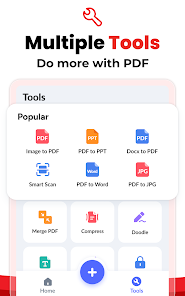
Image to PDF - PDF Maker can convert images (jpg, jpeg, png, etc.) to PDF files. Easy to use and 100% free. Try it now!
With Image to PDF - PDF Maker, you can:
►Convert all kinds of images to PDF
Import images or scan paper files with your camera and convert them to PDFs - notes, receipts, invoices, forms, business cards, certificates, whiteboards, ID cards, etc., all supported.
►Read all PDFs
Automatically scan and list all PDFs on your device, giving you quick access to them all. Easily doodle, add text, and sign with different colors, enjoying a lot of convenience with this PDF Reader.
►Resize images
Resize, crop, doodle, and rotate the images as you like. Optimize images for better PDF output.
►Auto sorting
Automatically sort images and PDF files by name, size, created date, modified date, etc. Of course, you can sort manually if you want.
►Compress PDF files
Support to reduce PDF size through compression. Set the image quality - low, medium, high, and original as needed.
►Set password
You can set passwords to protect your PDF files, and encrypt confidential files to be shared to prevent others from peeking at them.
►Work offline
No need to send data to the cloud, easily convert your images to PDF offline.
►Share converted PDF files
Easily send and share converted PDF files via social media, Bluetooth, Email, quick share, etc.
►Quick search
Try the quick search function, and you will find it’s easy to find your target files. Just enter the keywords and the results will be displayed automatically.
PERMISSION REQUIRED:
* For users of Android 11 and above, All Files Access permission is required to access, manage, and edit all PDF files on your device.
We will keep working hard to optimize the app and improve the user experience. Please feel free to contact us at imagetopdffeedback@gmail.com if you have any suggestions.
Convert image to PDF
Want to convert picture to pdf? The powerful features make this app an ultimate pdf creator for your device to convert jpg to pdf. You can convert jpg to pdf from gallery or take photos with the camera, and then convert photo to pdf. It's quite easy, right? Have a try!
PDF editor
It can not only convert picture to pdf. We're working hard to make this app not only a pdf maker to convert photo to pdf, but also a pdf maker with more features of pdf editor. Please stay tuned.
A reliable PDF scanner to convert jpg to pdf
Your files will be 100% safe when scanning with this pdf scanner. The entire process of file generation is done locally, we guarantee that the files will not be transferred to the server, so this free pdf converter app can be used for business purposes as well to convert image to pdf. It's the pdf scanner you can trust to convert jpg to pdf!
PDF creator
Convert image to pdf easily and safely! You can use a password to protect pdf with this pdf creator (also can be regarded as a pdf editor). With a user-friendly interface design, this free pdf converter app makes it easy for you to convert photo to pdf. You can merge multiple pictures to a single pdf file and share it as you like.
Free PDF converter app
Your first choice pdf maker. Easily convert your picture to pdf. All features are free and there is no limitation to convert jpg to pdf. You can convert all formats of photos to pdf by our app. Try this awesome pdf maker and convert your photos to pdf in no time!
Convert to pdf
We now present you this handy app to convert photos to pdf! You only need to select the document you want to convert to pdf, and the conversion will be done in seconds! We also support resizing images, auto sorting & compressing pdf files! Enjoy the great experience with this convert to pdf app!
With Image to PDF - PDF Maker, you can:
►Convert all kinds of images to PDF
Import images or scan paper files with your camera and convert them to PDFs - notes, receipts, invoices, forms, business cards, certificates, whiteboards, ID cards, etc., all supported.
►Read all PDFs
Automatically scan and list all PDFs on your device, giving you quick access to them all. Easily doodle, add text, and sign with different colors, enjoying a lot of convenience with this PDF Reader.
►Resize images
Resize, crop, doodle, and rotate the images as you like. Optimize images for better PDF output.
►Auto sorting
Automatically sort images and PDF files by name, size, created date, modified date, etc. Of course, you can sort manually if you want.
►Compress PDF files
Support to reduce PDF size through compression. Set the image quality - low, medium, high, and original as needed.
►Set password
You can set passwords to protect your PDF files, and encrypt confidential files to be shared to prevent others from peeking at them.
►Work offline
No need to send data to the cloud, easily convert your images to PDF offline.
►Share converted PDF files
Easily send and share converted PDF files via social media, Bluetooth, Email, quick share, etc.
►Quick search
Try the quick search function, and you will find it’s easy to find your target files. Just enter the keywords and the results will be displayed automatically.
PERMISSION REQUIRED:
* For users of Android 11 and above, All Files Access permission is required to access, manage, and edit all PDF files on your device.
We will keep working hard to optimize the app and improve the user experience. Please feel free to contact us at imagetopdffeedback@gmail.com if you have any suggestions.
Convert image to PDF
Want to convert picture to pdf? The powerful features make this app an ultimate pdf creator for your device to convert jpg to pdf. You can convert jpg to pdf from gallery or take photos with the camera, and then convert photo to pdf. It's quite easy, right? Have a try!
PDF editor
It can not only convert picture to pdf. We're working hard to make this app not only a pdf maker to convert photo to pdf, but also a pdf maker with more features of pdf editor. Please stay tuned.
A reliable PDF scanner to convert jpg to pdf
Your files will be 100% safe when scanning with this pdf scanner. The entire process of file generation is done locally, we guarantee that the files will not be transferred to the server, so this free pdf converter app can be used for business purposes as well to convert image to pdf. It's the pdf scanner you can trust to convert jpg to pdf!
PDF creator
Convert image to pdf easily and safely! You can use a password to protect pdf with this pdf creator (also can be regarded as a pdf editor). With a user-friendly interface design, this free pdf converter app makes it easy for you to convert photo to pdf. You can merge multiple pictures to a single pdf file and share it as you like.
Free PDF converter app
Your first choice pdf maker. Easily convert your picture to pdf. All features are free and there is no limitation to convert jpg to pdf. You can convert all formats of photos to pdf by our app. Try this awesome pdf maker and convert your photos to pdf in no time!
Convert to pdf
We now present you this handy app to convert photos to pdf! You only need to select the document you want to convert to pdf, and the conversion will be done in seconds! We also support resizing images, auto sorting & compressing pdf files! Enjoy the great experience with this convert to pdf app!
This easy PDF Converter is a photo to PDF tool with strong PDF compress support.
Updated on
Events & offers

Featured stories

Safety starts with understanding how developers collect and share your data. Data privacy and security practices may vary based on your use, region, and age. The developer provided this information and may update it over time.
- No data shared with third partiesLearn more about how developers declare sharing
- No data collectedLearn more about how developers declare collection
- Data is encrypted in transit
- You can request that data be deleted


Ratings and reviews
2.36M reviews

Otis Mohr
- Flag inappropriate
- Show review history
October 24, 2022
UPDATE: Now it is possible to remove ads with a subscription - nice! Still, I'd appreciate a one-time payment option, as the monthly subscription is quite expensive. Original: I use this for handing in written parts of my exams. However, having to watch ads while the timer is running out is annoying. It would be great to have an ad-free version of the app in exchange for a fee to speed up processes and doesn't lead to weird situations when mobile game ads are playing full blast in an exam. 😅
164 people found this review helpful
Simple Design Ltd.
October 25, 2022
Hi Otis, sorry for this. Since the subscription rule is developed by Google, we developers have no right to modify it. Based on a comprehensive evaluation of various factors, the current subscription price is finally determined. If you have an ideal price, please let us know via "Settings - Feedback". We will consider adjusting the price.🌹

Priyanka Hazarika
- Flag inappropriate
September 3, 2026
Too much unskippable ad is shown while using. And even after letting the whole ad play, we can't return to the ongoing work. While it's time to convert to pdf, after clicking convert, the ad is shown and probably we are redirected to another app, mostly play store, to install some other app and then we can't get back to this app to see the result after pdf conversion. It's very inconvenient and frustrating .
6 people found this review helpful
Simple Design Ltd.
September 4, 2026
Hi Priyanka, we're sorry for the inconvenience. Ads help keep the app free, but we'll optimize the experience. If unwanted redirection occurs, it may be due to accidental taps. Please wait for the "Close/X" button to appear. Additionally, you can pay to remove ads if needed.🌹

Rathna Murali
- Flag inappropriate
August 13, 2026
This is the best app I have ever used I have used many apps in the past. But I have never used any app like this. create PDF Document filter is super duper. It is easy to use. And the best thing is it is completely free. Ads are not a big problem only few ads are played. You can turn off your internet to get rid of ads. Overall I would suggest this app to every students and teachers. Very very useful.
19 people found this review helpful
Simple Design Ltd.
August 28, 2026
Hi Rathna, thank you for your review!😘 We are continuously working on adding more features to our app to make your experience better. If you have any suggestions, please feel free to contact us via "Settings - Feedback". All the best!🌹
What’s new
🌟 Supported real-time edge detection and auto capture
🌟 Optimized performance and interaction
🌟 Fixed minor bugs
🌟 Optimized performance and interaction
🌟 Fixed minor bugs
USK: All ages
Learn moreApp support
About the developer
ABISHKKING LIMITED
abishkking@gmail.com
Rm 1101 11/F SAN TOI BLDG
139 CONNAUGHT RD C
上環
香港島
Hong Kong
+852 5170 9026


